Configure RIP Plain Text authentication on an interface to enable authentication for RIP Version 2 packets .
This task enables RIP authentication on interfaces to secure RIP Version 2 packet exchanges and prevent unauthorized routing updates.
RIP Version 1 does not support authentication. If you are sending and receiving RIP Version 2 packets, you can enable RIP authentication on an interface.
The key chain specifies the set of keys that can be used on the interface. If a key chain is not configured, the interface does not perform authentication, including the default option.
How to Configure RIPv2 Authentication with a Key Chain
Create the Key Chain and Keys:
Define a key chain and configure the key ID and password (key-string):
text
Device(config)# key chain <key-chain-name>Device(config-keychain)# key <key-id>Device(config-keychain-key)# key-string <password>
Apply Authentication to the Interface:
Device(config-if)#ip rip authentication key-chain <chain name>device(config-if)#ip rip authentication mode text
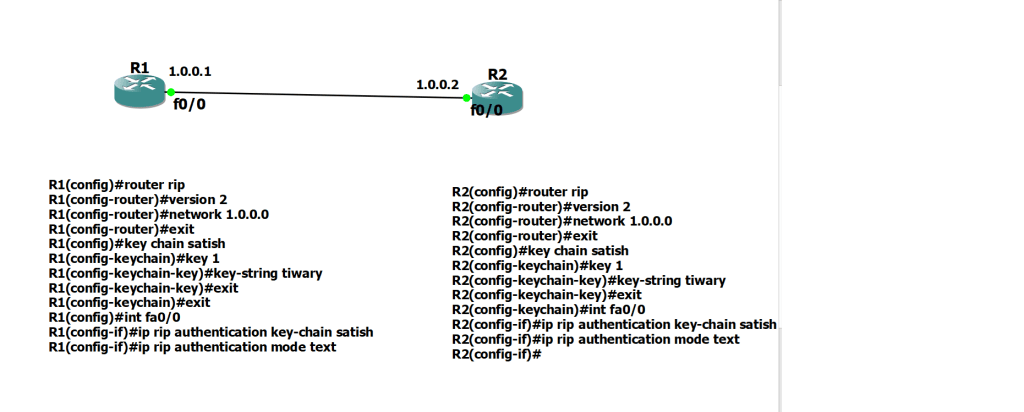
Configuration on Router R1:
R1(config)#router ripR1(config-router)#version 2R1(config-router)#network 1.0.0.0R1(config-router)#exitR1(config)#key chain satishR1(config-keychain)#key 1R1(config-keychain-key)#key-string tiwaryR1(config-keychain-key)#exitR1(config-keychain)#exitR1(config)#int fa0/0R1(config-if)#ip rip authentication key-chain satishR1(config-if)#ip rip authentication mode text
Configuration on Router R2:
R2(config)#router ripR2(config-router)#version 2R2(config-router)#network 1.0.0.0R2(config-router)#exitR2(config)#key chain satishR2(config-keychain)#key 1R2(config-keychain-key)#key-string tiwaryR2(config-keychain-key)#exitR2(config-keychain)#int fa0/0R2(config-if)#ip rip authentication key-chain satishR2(config-if)#ip rip authentication mode textR2(config-if)#
Important Rules
- RIPv1 Limit: RIPv1 does not support authentication; it must be running RIPv2.
- Matching Parameters: Neighboring routers must share the exact same
key-stringand authentication mode. For MD5 mode, the key number (ID) must also match between neighbors. - Verification: Use commands like
show ip ripshow keychaindebug ip rip- to check status and troubleshoot failed handshakes
Discover more from Learn Linux CCNA CCNP CEH CISSP CISA Penetration-Testing Bug Bounty IPv6 Cyber-Security Network-Security Online
Subscribe to get the latest posts sent to your email.

