Static Routing Lab using 3 routers in few simple steps. Let’s Learn to configure static routing using three routers in a circle using cisco packet tracer.
I am using three routers total for this static routing Lab and I am using cisco packet tracer software for this routing configuration Lab.
You can just configure this routing lab in few simple steps:
Assign Ip address on Each routers and PC.
Configure Static Route on each Routers for their indirectly connected networks.
Here I assume you guys already know how to configure IP Address on routers.
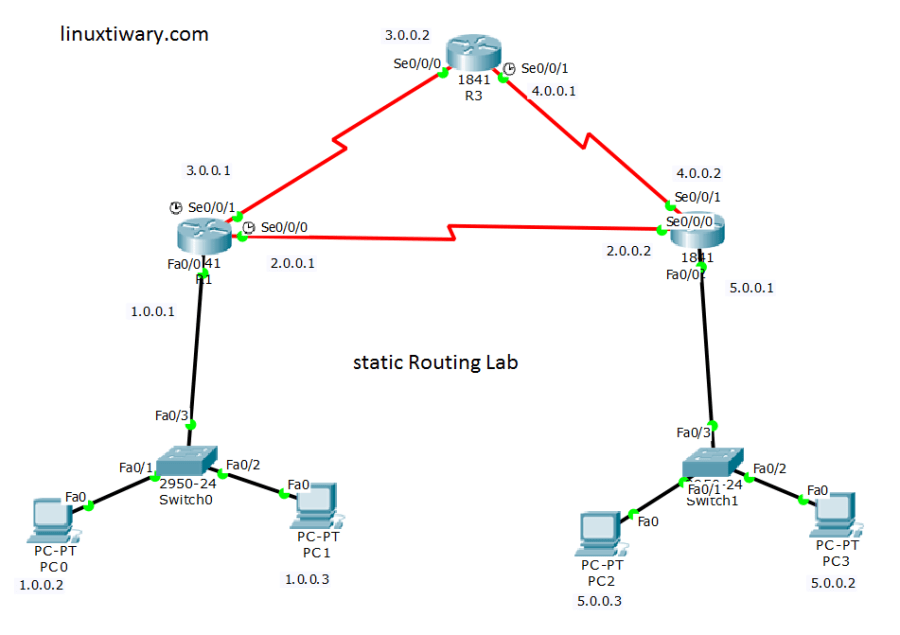
Static Routing Configuration on Router R1:
R1(config)#ip route 4.0.0.0 255.0.0.0 3.0.0.2

R1(config)#ip route 4.0.0.0 255.0.0.0 2.0.0.2

R1(config)#ip route 5.0.0.0 255.0.0.0 2.0.0.2

R1(config)#ip route 5.0.0.0 255.0.0.0 3.0.0.2
Static Routing Configuration on Router R2:
R2(config)#ip route 1.0.0.0 255.0.0.0 2.0.0.1

R2(config)#ip route 1.0.0.0 255.0.0.0 4.0.0.1

R2(config)#ip route 3.0.0.0 255.0.0.0 4.0.0.1

R2(config)#ip route 3.0.0.0 255.0.0.0 2.0.0.1
Static Routing Configuration on Router R3:
R3(config)#ip route 1.0.0.0 255.0.0.0 3.0.0.1

R3(config)#ip route 1.0.0.0 255.0.0.0 4.0.0.2

R3(config)#ip route 2.0.0.0 255.0.0.0 4.0.0.2

R3(config)#ip route 2.0.0.0 255.0.0.0 3.0.0.1

R3(config)#ip route 5.0.0.0 255.0.0.0 4.0.0.2

R3(config)#ip route 5.0.0.0 255.0.0.0 3.0.0.1
Check routing Tables of Routers:
Routing Table of Router R1:
R1#show ip route

C 1.0.0.0/8 is directly connected, FastEthernet0/0

C 2.0.0.0/8 is directly connected, Serial0/0/0

C 3.0.0.0/8 is directly connected, Serial0/0/1

S 4.0.0.0/8 [1/0] via 2.0.0.2

[1/0] via 3.0.0.2

S 5.0.0.0/8 [1/0] via 2.0.0.2

[1/0] via 3.0.0.2
Routing Table of Router R2:
R2#show ip route

S 1.0.0.0/8 [1/0] via 2.0.0.1

[1/0] via 4.0.0.1

C 2.0.0.0/8 is directly connected, Serial0/0/0

S 3.0.0.0/8 [1/0] via 4.0.0.1

[1/0] via 2.0.0.1

C 4.0.0.0/8 is directly connected, Serial0/0/1

C 5.0.0.0/8 is directly connected, FastEthernet0/0
Routing Table of Router R3:
R3#show ip route

S 1.0.0.0/8 [1/0] via 3.0.0.1

[1/0] via 4.0.0.2

S 2.0.0.0/8 [1/0] via 4.0.0.2

[1/0] via 3.0.0.1

C 3.0.0.0/8 is directly connected, Serial0/0/0

C 4.0.0.0/8 is directly connected, Serial0/0/1

S 5.0.0.0/8 [1/0] via 4.0.0.2

[1/0] via 3.0.0.1
Discover more from Learn Linux CCNA CCNP CEH CISSP CISA Penetration-Testing Bug Bounty IPv6 Cyber-Security Network-Security Online
Subscribe to get the latest posts sent to your email.
 Learn Linux CCNA CCNP CEH CISSP CISA Penetration-Testing Bug Bounty IPv6 Cyber-Security Network-Security Online