As we know RIPv2 support routing with subnetting.So here in this lab we are going to configure RIPv2 using subnetting and you can understand the complete scenario with help of below diagram and codes.
This entire tutorial will guide you how to implement subnetting to RIPv2 and show you how to configure RIPv2 easily with subnneted address.

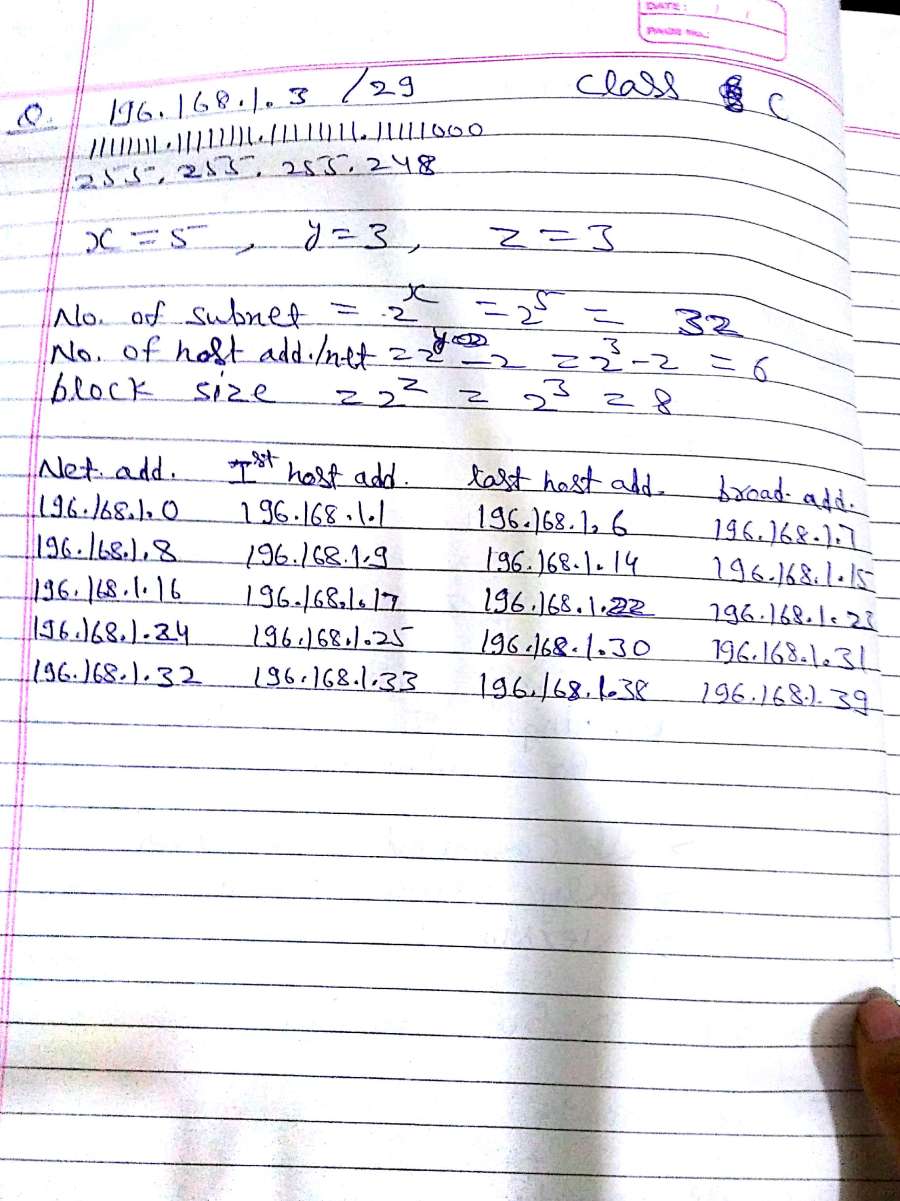
Now we will configure RIPv2 according to above subnetting Chart mentioned above.
Ip address and RIPv2 Configuration on Router0:
Router>
Router>enable
Router#configure terminal
Enter configuration commands, one per line. End with CNTL/Z.
Router(config)#interface FastEthernet0/0
Router(config-if)#ip address 196.168.1.33 255.255.255.248
Router(config-if)#no shutdown
Router(config-if)#
%LINK-5-CHANGED: Interface FastEthernet0/0, changed state to up
%LINEPROTO-5-UPDOWN: Line protocol on Interface FastEthernet0/0, changed state to up
exit
Router(config)#int fa0/1
Router(config-if)#ip add 196.168.1.1 255.255.255.248
Router(config-if)#no shut
Router(config-if)#exit
Router(config)#router rip
Router(config-router)#version 2
Router(config-router)#network 192.168.1.32
Router(config-router)#network 196.168.1.0
Router(config-router)#exit
IP address and RIPv2 Configuration on Router3:
Router>enable
Router#configure terminal
Enter configuration commands, one per line. End with CNTL/Z.
Router(config)#interface FastEthernet0/0
Router(config-if)#ip address 196.168.1.9 255.255.255.0
Router(config-if)#ip address 196.168.1.9 255.255.255.248
Router(config-if)#no shutdown
Router(config-if)#
%LINK-5-CHANGED: Interface FastEthernet0/0, changed state to up
%LINEPROTO-5-UPDOWN: Line protocol on Interface FastEthernet0/0, changed state to up
Router(config-if)#exit
Router(config)#interface FastEthernet0/1
Router(config-if)#ip address 196.168.1.4 255.255.255.248
Router(config-if)#no shutdown
Router(config-if)#
%LINK-5-CHANGED: Interface FastEthernet0/1, changed state to up
%LINEPROTO-5-UPDOWN: Line protocol on Interface FastEthernet0/1, changed state to up
exit
Router(config)#router rip
Router(config-router)#network 196.168.1.8
Router(config-router)#network 196.168.1.0
Router(config-router)#
IP address and RIPv2 Configuration on Router1:
Router>enable
Router#configure terminal
Enter configuration commands, one per line. End with CNTL/Z.
Router(config)#interface FastEthernet0/0
Router(config-if)#ip address 196.168.1.2 255.255.255.0
Router(config-if)#ip address 196.168.1.2 255.255.255.248
Router(config-if)#no shutdown
Router(config-if)#
%LINK-5-CHANGED: Interface FastEthernet0/0, changed state to up
%LINEPROTO-5-UPDOWN: Line protocol on Interface FastEthernet0/0, changed state to up
Router(config-if)#exit
Router(config)#interface FastEthernet0/1
Router(config-if)#ip address 196.168.1.25 255.255.255.248
Router(config-if)#no shutdown
Router(config-if)#
%LINK-5-CHANGED: Interface FastEthernet0/1, changed state to up
%LINEPROTO-5-UPDOWN: Line protocol on Interface FastEthernet0/1, changed state to up
exit
Router(config)#router rip
Router(config-router)#version 2
Router(config-router)#network 196.168.1.0
Router(config-router)#network 196.168.1.24
Router(config-router)#exit
Router(config)#
IP address and RIPv2 route Configuration on Router2:
Router>enable
Router#configure terminal
Enter configuration commands, one per line. End with CNTL/Z.
Router(config)#interface FastEthernet0/0
Router(config-if)#ip address 196.168.1.3 255.255.255.0
Router(config-if)#ip address 196.168.1.3 255.255.255.248
Router(config-if)#no shutdown
Router(config-if)#
%LINK-5-CHANGED: Interface FastEthernet0/0, changed state to up
%LINEPROTO-5-UPDOWN: Line protocol on Interface FastEthernet0/0, changed state to up
Router(config-if)#exit
Router(config)#interface FastEthernet0/1
Router(config-if)#ip address 196.168.1.17 255.255.255.248
Router(config-if)#no shutdown
Router(config-if)#
%LINK-5-CHANGED: Interface FastEthernet0/1, changed state to up
%LINEPROTO-5-UPDOWN: Line protocol on Interface FastEthernet0/1, changed state to up
exit
Router(config)#router rip
Router(config-router)#version 2
Router(config-router)#network 196.168.1.0
Router(config-router)#network 196.168.1.16
Router(config-router)#exit
Router(config)#
Discover more from Learn Linux CCNA CCNP CEH CISSP CISA Penetration-Testing Bug Bounty IPv6 Cyber-Security Network-Security Online
Subscribe to get the latest posts sent to your email.
 Learn Linux CCNA CCNP CEH CISSP CISA Penetration-Testing Bug Bounty IPv6 Cyber-Security Network-Security Online