Learn to configure DHCP Server on Router and also learn how to setup ip helper address on Router.
How to configure a Router to work as a DHCP Server.
How to setup ip helper address on a Router
How to configure a Router to work as a DHCP Server for indirectly connected networks.
Note: In This Lab we are going To configure Router R1 as DHCP server.
Step 1: Build The Network topology for DHCP Server Lab

Let Me separate R1 R2 and R3 Images separately so that you can see the images clearly.

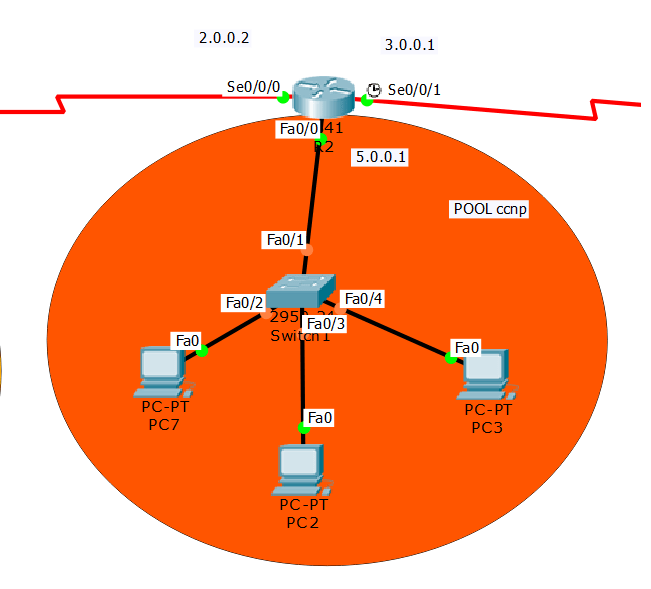
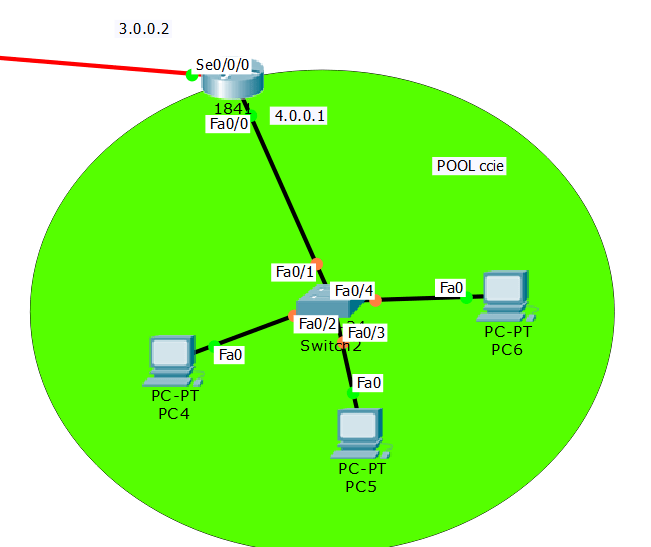
Step 2: Assign IP Address On Each Router Interfaces.
here I assume you guys know how to assign ip address on router interfaces.
If you have any problem you can see my articles on it.
Step 3: Configure Routing on each Router. router R1,R2 and R3
Static Routing Configuration On Router R1:
Router(config)#host R1

R1(config)#ip route 4.0.0.0 255.0.0.0 2.0.0.2

R1(config)#ip route 5.0.0.0 255.0.0.0 2.0.0.2

R1(config)#ip route 3.0.0.0 255.0.0.0 2.0.0.2
Static Routing Configuration On Router R2:
Router(config)#host R2

R2(config)#ip route 1.0.0.0 255.0.0.0 2.0.0.1

R2(config)#ip route 4.0.0.0 255.0.0.0 3.0.0.2
Static Routing Configuration On Router R3:
Router(config)#host R3

R3(config)#ip route 1.0.0.0 255.0.0.0 3.0.0.1

R3(config)#ip route 2.0.0.0 255.0.0.0 3.0.0.1

R3(config)#ip route 5.0.0.0 255.0.0.0 3.0.0.1
verify routing Table on Router R1:
R1#show ip route

Codes: C - connected, S - static, I - IGRP, R - RIP, M - mobile, B - BGP

D - EIGRP, EX - EIGRP external, O - OSPF, IA - OSPF inter area

N1 - OSPF NSSA external type 1, N2 - OSPF NSSA external type 2

E1 - OSPF external type 1, E2 - OSPF external type 2, E - EGP

i - IS-IS, L1 - IS-IS level-1, L2 - IS-IS level-2, ia - IS-IS inter area

* - candidate default, U - per-user static route, o - ODR

P - periodic downloaded static route

Gateway of last resort is not set

C 1.0.0.0/8 is directly connected, FastEthernet0/0

C 2.0.0.0/8 is directly connected, Serial0/0/0

S 3.0.0.0/8 [1/0] via 2.0.0.2

S 4.0.0.0/8 [1/0] via 2.0.0.2

S 5.0.0.0/8 [1/0] via 2.0.0.2
verify routing Table on Router R2:
R2#show ip route

Codes: C - connected, S - static, I - IGRP, R - RIP, M - mobile, B - BGP

D - EIGRP, EX - EIGRP external, O - OSPF, IA - OSPF inter area

N1 - OSPF NSSA external type 1, N2 - OSPF NSSA external type 2

E1 - OSPF external type 1, E2 - OSPF external type 2, E - EGP

i - IS-IS, L1 - IS-IS level-1, L2 - IS-IS level-2, ia - IS-IS inter area

* - candidate default, U - per-user static route, o - ODR

P - periodic downloaded static route

Gateway of last resort is not set

S 1.0.0.0/8 [1/0] via 2.0.0.1

C 2.0.0.0/8 is directly connected, Serial0/0/0

C 3.0.0.0/8 is directly connected, Serial0/0/1

S 4.0.0.0/8 [1/0] via 3.0.0.2

C 5.0.0.0/8 is directly connected, FastEthernet0/0
verify routing Table on Router R3:
R3#show ip route

Codes: C - connected, S - static, I - IGRP, R - RIP, M - mobile, B - BGP

D - EIGRP, EX - EIGRP external, O - OSPF, IA - OSPF inter area

N1 - OSPF NSSA external type 1, N2 - OSPF NSSA external type 2

E1 - OSPF external type 1, E2 - OSPF external type 2, E - EGP

i - IS-IS, L1 - IS-IS level-1, L2 - IS-IS level-2, ia - IS-IS inter area

* - candidate default, U - per-user static route, o - ODR

P - periodic downloaded static route

Gateway of last resort is not set

S 1.0.0.0/8 [1/0] via 3.0.0.1

S 2.0.0.0/8 [1/0] via 3.0.0.1

C 3.0.0.0/8 is directly connected, Serial0/0/0

C 4.0.0.0/8 is directly connected, FastEthernet0/0

S 5.0.0.0/8 [1/0] via 3.0.0.1
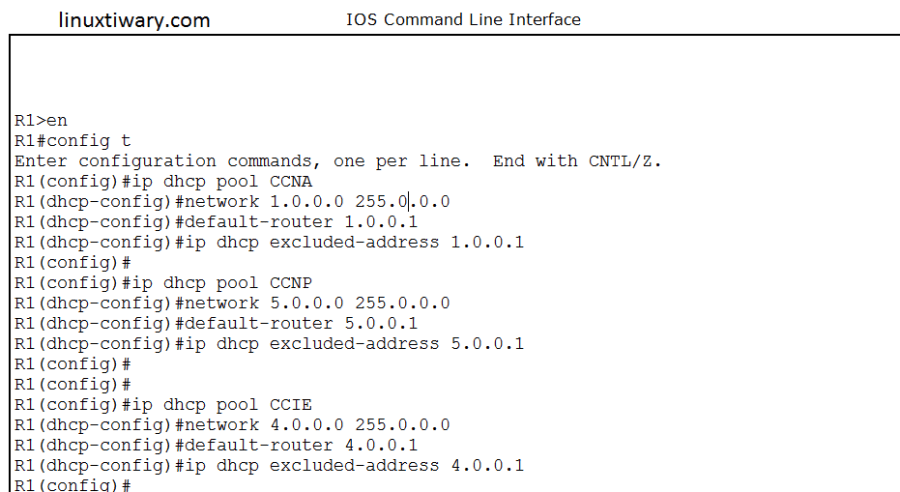
Step 4:Configure DHCP POOL for Each Network on Router R1.
DHCP POOL creation for network 1.0.0.0 and POOL CCNA.
R1(config)#ip dhcp pool CCNA

R1(dhcp-config)#network 1.0.0.0 255.0.0.0

R1(dhcp-config)#default-router 1.0.0.1

R1(dhcp-config)#ip dhcp excluded-address 1.0.0.1
DHCP POOL creation for network 5.0.0.0 and POOL CCNP.
R1(config)#ip dhcp pool CCNP

R1(dhcp-config)#network 5.0.0.0 255.0.0.0

R1(dhcp-config)#default-router 5.0.0.1

R1(dhcp-config)#ip dhcp excluded-address 5.0.0.1
DHCP POOL creation for network 4.0.0.0 and POOL CCIE
R1(config)#ip dhcp pool CCIE

R1(dhcp-config)#network 4.0.0.0 255.0.0.0

R1(dhcp-config)#default-router 4.0.0.1

R1(dhcp-config)#ip dhcp excluded-address 4.0.0.1
Step 5: Setup IP helper Address on Router R2:
R2(config)#int fa0/0

R2(config-if)#ip helper-address 2.0.0.1
Step 6:Setup IP helper Address on Router R3:
R3(config)#int fa0/0

R3(config-if)#ip helper-address 2.0.0.1

R3(config-if)#
Step 7:Check DHCP IP bindings list on router R1 on which DHCP has been configured.
R1#show ip dhcp binding

IP address Client-ID/ Lease expiration Type

Hardware address

1.0.0.2 0060.47CB.8AD4 -- Automatic

1.0.0.3 00D0.FF2C.57AB -- Automatic

1.0.0.4 000C.856B.7ABC -- Automatic

5.0.0.2 00E0.B092.E710 -- Automatic

5.0.0.3 0060.479A.5982 -- Automatic

5.0.0.4 0002.17E1.A958 -- Automatic

4.0.0.2 000A.41B4.C278 -- Automatic

4.0.0.3 0006.2A73.A1EB -- Automatic

4.0.0.4 00D0.D379.3AB8 -- Automatic

R1#
DHCP Troubleshooting commands:
1.exclude range of ip address from any pool
#ip dhcp excluded-address 1.0.0.1 1.0.0.100
2.Exclude only one ip from POOL.
#ip dhcp excluded-address 1.0.0.1
3. Check different dhcp related information:
#show ip dhcp binding

#show ip dhcp binding 1.0.0.3

#clear ip dhcp binding 1.0.0.1
(this command will clears an automatic address from the dhcp server database)
#clear ip dhcp binding  *

#clear ip dhcp conflict

#clear ip dhcp conflict 1.0.0.1

#clear ip dhcp conflict  *

#show ip dhcp database

#show ip dhcp server statistics

#clear ip dhcp server statistics
Note: Few of troubleshooting command will not work in packet tracer but all these commands will work perfectly on real cisco router and also inside GNS3.
Discover more from Learn Linux CCNA CCNP CEH CISSP CISA Penetration-Testing Bug Bounty IPv6 Cyber-Security Network-Security Online
Subscribe to get the latest posts sent to your email.
 Learn Linux CCNA CCNP CEH CISSP CISA Penetration-Testing Bug Bounty IPv6 Cyber-Security Network-Security Online