This is a cisco packet tracer lab showing how to backup and restore router configuration using a ftp server.So in this tutorial we will learn how to take backup of router configuration over a ftp server and how to restore it back from ftp server when we need it.This is a detail tutorial about router configuration backup and restoration using ftp server,but instead of FTP server one can use TFTP server too.
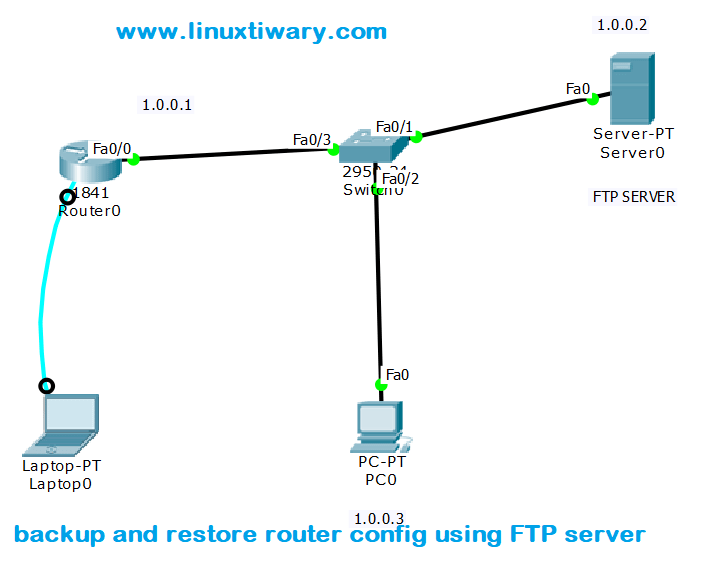
Step 1:Draw the above diagram and arrange the device as it is and configure FTP server.

Note: Here tiwary is the username and tiwary123 is it’s password.
This username and password will be used to login ftp server.
Step2: Assign ip address on router interface and enable port configure enable password or telnet whatever you want to configure.
Router>enable
Router#configure terminal

Router(config)#interface FastEthernet0/0
Router(config-if)#ip address 1.0.0.1 255.0.0.0
Router(config-if)#no shutdown
Step 3:configure enable password or telnet and even more whatever you want to configure.
here i am configuring enable password and Telnet on router.
Router(config-if)#exit
Router(config)#enable password redhat
Router(config)#line vty 0 4
Router(config-line)#password telnet123
Router(config-line)#login
Router(config-line)#exit
Router(config)#exit
Step4: Save running-config data to startup-config
Router#copy run start
Destination filename [startup-config]?
Building configuration...[OK]
Step 5: Create FTP User and Assign Ftp users passwords on Router.
Remember this username and password must be same as username and password assigned on your FTP server.
Router#config t
Router(config)#ip ftp username tiwary
Router(config)#ip ftp password tiwary123
Router(config)#exit
Step 6: Backup router Configuration on FTP server.
Router#copy run ftp:
Address or name of remote host []? 1.0.0.2
Destination filename [Router-confg]?
Writing running-config...[OK - 650 bytes]650 bytes copied in 0.067 secs (9000 bytes/sec)


Router#
Now Delete Startup-config from Router
Router#erase startup-config
Delete Running-Config from router.
Router#reload
After reload your router will be a fresh router, a brand new router.
Before Restore you have to assign IP address to Router Interface and run no shutdown command.
Step7: Restore from backup file kept over FTP
Router#copy ftp: running-config
Address or name of remote host []? 1.0.0.2
source filename []? Router-confg
Destination filename [running-config]?
Accessing ftp://1.0.0.2/Router-confg...[OK - 650 bytes]650 bytes copied in 0.002 secs (325000 bytes/sec)
Router#
If you are new to Networking or Cisco Packet Tracer you can Learn How to Use Cisco Packet Tracer in Just one Video.
Discover more from Learn Linux CCNA CCNP CEH CISSP CISA Penetration-Testing Bug Bounty IPv6 Cyber-Security Network-Security Online
Subscribe to get the latest posts sent to your email.


[…] https://linuxtiwary.com/2017/12/24/backup-and-restore-router-configuration-using-ftp-servera-cisco-p… […]
LikeLike