
In this lab we will learn how to configure backup route configuration in packet tracer.This is an example lab showing backup route configuration betwenn router0 and Router1.
Step 1:Configure ip address as mentioned in Diagram.
Step2: Route Configuration on Router0
router0(config)#ip route 3.0.0.0 255.0.0.0 2.0.0.2
router0(config)#ip route 3.0.0.0 255.0.0.0 4.0.0.2 20
Step 3: Route Configuration on Router1
Router1(config)#ip route 1.0.0.0 255.0.0.0 2.0.0.1

Router1(config)#ip route 1.0.0.0 255.0.0.0 4.0.0.1 20
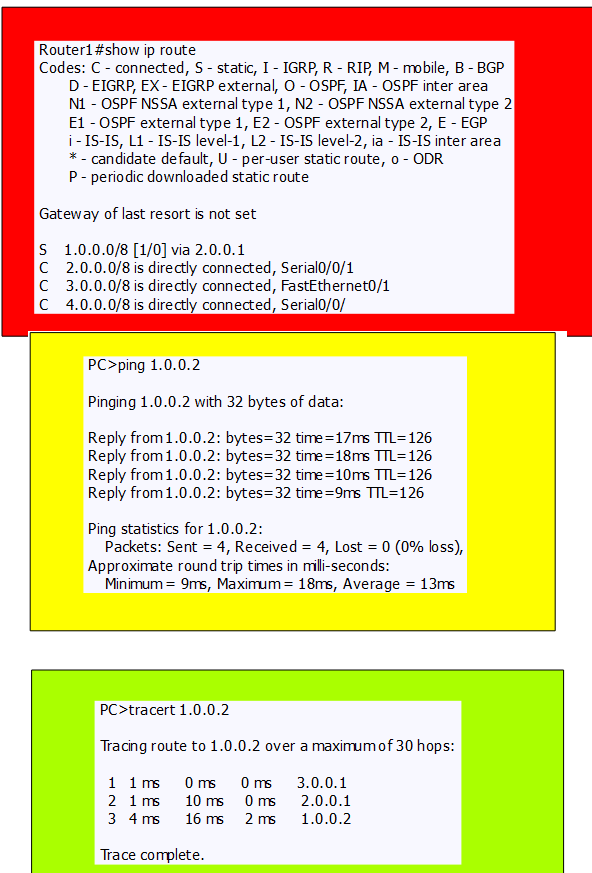
Step4: Verfication of above configuration.

Discover more from Learn Linux CCNA CCNP CEH CISSP CISA Penetration-Testing Bug Bounty IPv6 Cyber-Security Network-Security Online
Subscribe to get the latest posts sent to your email.
 Learn Linux CCNA CCNP CEH CISSP CISA Penetration-Testing Bug Bounty IPv6 Cyber-Security Network-Security Online